Organizational Intelligence

The memory of your organization. Everything it knows, captured as sourced facts, structured by a curated taxonomy, and available to everything you make.

Available now. Last checked: September 2026.

Learn next: Strategic Composition · Governance · Asset Library · Collections · Datasets · Signals · Personas

01What it is

The governed body of what your organization knows, held as sourced facts. It is not a knowledge base that sits and waits to be read. It puts knowledge to work in everything you make, and a finished deck or document offers back what it added, for a person to accept. Facts, positioning, proof, methodology, people, and customer stories all live here with their provenance.

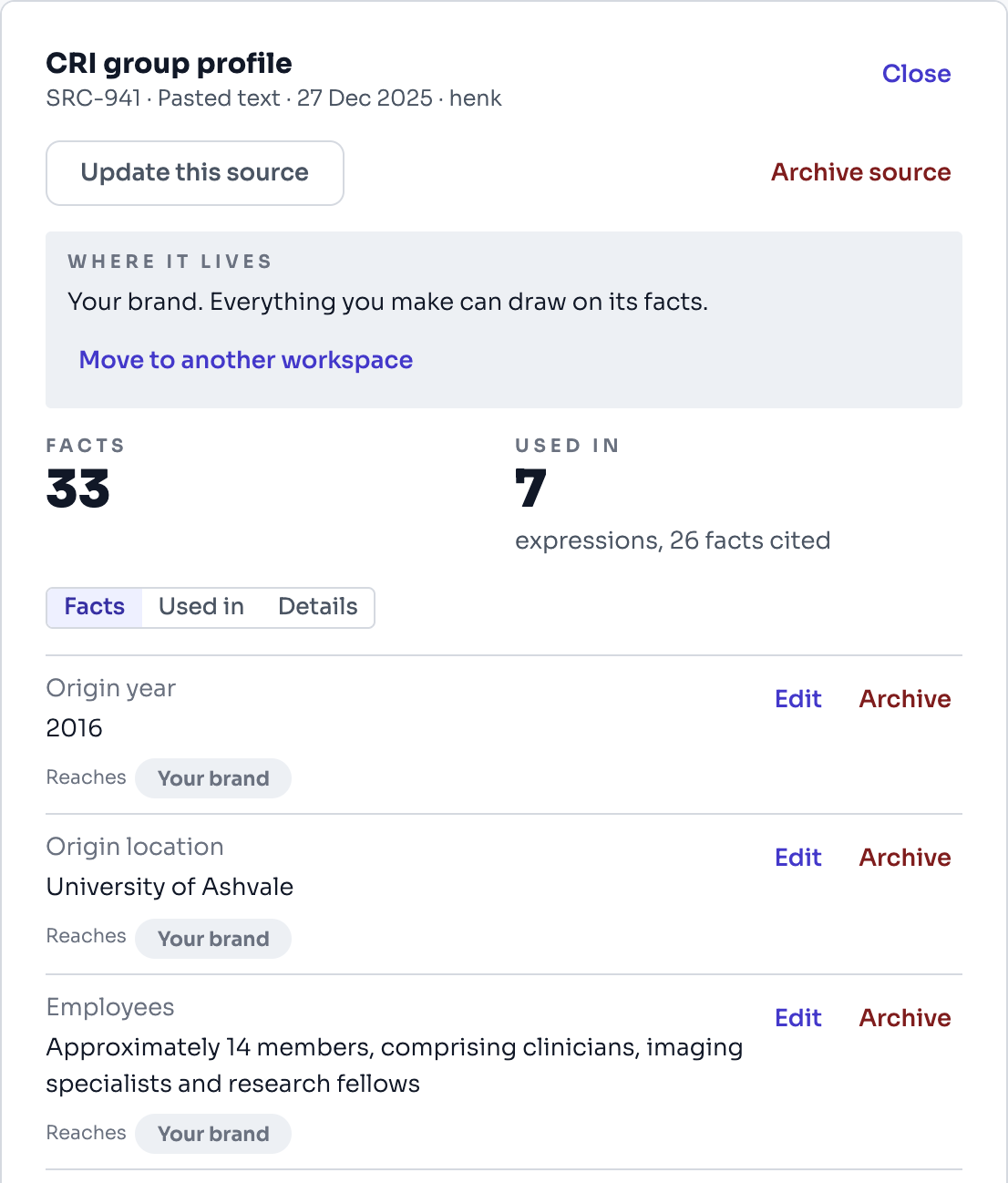
One source opened beside the list: where it lives, what it is used in, and the facts read from it, such as when the institute began, where, and how many people work there. Each is marked with where it reaches.
Sources, one source opened · the facts read from it, each marked with where it reachesDemo: a fictional cardiovascular research institute, with simulated figures.
02Why it matters

Organizations do not lose knowledge. They lose access to it. Captured once, it is available everywhere, and it stays when people leave. The intelligence base is the foundation; every other capability is a view of it.

03How it works

Uploads and websites are read as they arrive, scoped to the project or customer they belong to, checked for what you already hold, and turned into sourced facts. Knowledge is organized by a curated taxonomy of more than 300 fields across 15 modules. Every fact carries its source, and citations run both directions, from a claim to its source and from a source to everywhere it is used. Foundation presents it in five groups (your brand, how it looks, how it sounds, your organization, and what you sell), and a per-member team extractor turns people into deduplicated cards.

Each source is read for whose it is. A tender or a client's own document is read as theirs, so their requirements are never claimed as yours, and you can correct the call. A PDF is transcribed in its own language and wording, with any part that cannot be read marked as such, and the text in an uploaded screenshot or scanned table is read too. Each fact from a PDF names the page it is on, counted from the first page of the file. The PDF itself is kept, privately, so you can open the original from its source and check a fact against the page. Uploading the same PDF again reuses the reading already made. A report marked confidential (client confidential, proprietary or not for distribution) keeps its facts restricted by default: only administrators see them, and Gyrium leaves them out of what it writes. That covers the pages read later and the facts of its figures too. It is a choice, made when you upload and changed later by an administrator. A long report, from 15 pages, can be indexed first: Gyrium maps every page and keeps the report's key findings, quoted word for word, as facts, and you read more pages in full when you need them. A web link that leads to a PDF is read the same way as an uploaded PDF, and the source remembers the link it came from. A link to another kind of file (a Word document, a spreadsheet, an image) is named for what it is, so you know to upload it instead.

Every fact is labelled with the language it is written in, whichever way it arrived: read from a source, typed in by hand, or taken from a team profile. A French source can therefore stand behind an English piece, and its facts are still read as French.

Some of what an organization knows should never be written into a communication. Bank details, insurance policies, your discount policy and your data protection contact are held apart: only an administrator can see them, and they are kept out of composition unless an administrator deliberately turns that on.

Some of it must come out word for word. Your approved about-us paragraphs, your legal disclaimer and your copyright line are marked to be reused exactly as written, so the wording your lawyers agreed is the wording that ships.

Specifications come apart into facts you can cite. Each value on a datasheet, a load rating or an operating temperature, becomes its own fact, and a name and its value stay together when they are composed, so a figure never attaches to the wrong product. A number keeps its qualifier too: "not more than 48 hours" is held as an upper limit, a range stays a range, and an approximate figure is never presented as a measurement.

Each customer carries a profile: what they offer, where they operate, their market, who they sell to, the problems they face, their competitors and what they stand for. Every field shows where it came from and when. The profile is read in the customer's own language and grounds every piece you make for that customer, so nobody retypes it into a brief.

A finished deck or document offers back what it added. A claim in it that no fact supports is offered as a candidate new fact, with the words it was quoted from, and it joins the base only when a person accepts it.
04How to use it
  1. Add a source: in Sources, choose + Add a source at the top, then upload a document or import a website, and Gyrium extracts what it holds.
  2. Give a source a name people will recognize: open it in Sources and choose Rename, type the name and choose Save name. A report is listed under its own title and a website under its domain; a pasted text with nothing to go on shows Name it in the list.
  3. Connect a source that is already extracted, to make its facts reachable from another workspace or collection without duplicating them.
  4. Facts are scoped to the project or customer they belong to.
  5. Review and curate on the intelligence pages.
  6. Compose Expressions; they draw from the base, and a finished deck or document offers back what it added, for you to accept.
  7. In Sources, each row starts with what the source is (PDF, DOC, TXT for pasted text, WEB, TAB for a table, IMG for what was read off the Team page's photos, HAND for typed in), then its name, and under it where it lives, how many facts it gave, how many of them are used and its file name. Hold the pointer on a row to see its reference (SRC-…). Pick a source in the list: it opens beside the list, and the list stays where it was. At the top, Where it lives says in one line who draws on its facts: your brand foundation (everything you make) or one workspace (only what you make there). Under it are the workspaces it is connected to and the collections it is in, when there are any. Choose Disconnect beside a workspace, or Remove beside a collection, to take that link away; the source and its facts stay where they live. For a report or a website, Read says how far Gyrium read it, for example "Indexed, 36 pages · read in full: pp. 13-15". Then the tabs, each with its count: Facts to correct or archive what it gave, Used in for every expression that cites it, Assets for the figures and tables kept from it, and About for where it came from and, for an indexed report, its pages.
  8. Before you move, archive or restrict a source, look at Used in: each deck, document, web page, email or social post that cites one of its facts, marked Signed off where it is. Choose Open to go to it. Moving, archiving or restricting also says how many expressions cite the source. What is already made keeps what it says; an expression that cites a fact which is no longer on file says so, and you bring it up to date there.
  9. When a source changes (a new edition of a report, a website that was rewritten, text that was wrong), open it in Sources and choose Update this source. Upload the newer file or paste the new text. For a website, first choose Check for changes if you are not sure the site changed: it costs nothing, says how many of its pages changed since Gyrium read them, and what reading it again would cost. Then choose Read the site again. Then choose Read the new version. Gyrium reads it into the same source, so where it lives and what it is connected to stay the same. It then shows what is new (already added), what changed (the old value struck through, the new one under it) and what the new version no longer says. Tick what to replace and what to archive, look at what rests on those facts, and choose Apply the update. Replace and archive nothing keeps both old and new values.
  10. To check a fact against the document it came from, open the source in Sources and choose Open the PDF. The file opens in a new tab.
  11. When you upload a PDF, Keep the facts restricted if the report is marked confidential is ticked. Untick it when your organization may use the report's content freely. An administrator can change it later on the source in Sources: Release these facts, or Restrict these facts again.
  12. When you upload a PDF of 15 pages or more, choose Index it first (the default) or Read all its pages now. Read all for a tender or a brief, where every requirement counts.
  13. To read a PDF that is online, paste its address under Web link. Gyrium checks the link as you type: when it is a PDF, the form says so and offers the same choices as an uploaded PDF (the page count, Index it first or Read all, the price, and the confidential box). Then choose Upload & extract. The source keeps the link; to read a newer edition later, choose Update this source, then Fetch it from its link again.
  14. To read more of an indexed report, open it in Sources and choose About (or Read more pages beside Read). Under Indexed report, look for the pages you need, enter the first and last page and choose Read these pages. Their facts arrive as a source of their own, next to the report.
  15. To keep the charts and figures of an indexed report, open it in Sources, choose Assets, then Images found in this report. Gyrium cuts each one out of its page. Answer once whether they may be shown outside your organization (We are licensed to show them or Not sure: internal use only), mark the ones you want as Keep, use Wider or Tighter when a cut is off, and save. They go to the asset library as report figures, with the report and page in their credit line. Keeping costs little; reading a figure's data is the costly step, so it happens only when you ask: choose Read the data on a kept figure. Gyrium then records what the figure says, what it covers (a footnote can limit a chart to some countries) and which values are printed in it. A table is saved as a table you can open and use. The figure's claim and its printed values become facts, in a source of their own that is shown inside the report under Read later from this report; values read off an axis are marked approximate and never become facts. A figure is read once; asking again shows the same reading at no cost. Once a chart is read, Redraw in house style draws it again in your brand's colours and type, from the values that were read. Series that add up are stacked, a scenario or a target says so in its name, and the source line under the chart says where it was redrawn from, what it covers and whether its values are approximate. Keep the redrawn chart stores it as a table; on a slide, add a chart and choose Draw it from a stored table to place it.
  16. When two facts disagree, settle them: on the dashboard choose Resolve now, and in Two facts disagree choose Keep this under the right one, or They're both right (keep both) when both are true. Until a disagreement is settled, neither fact is used in anything you compose, and the tips on each piece that cites one say it is in dispute.
05Q&A
How is this different from a knowledge base like Notion or Confluence?

A knowledge base stores information and waits to be read, so it rots. This puts knowledge to work in everything you make, and finished work offers what it added back to the base, for a person to accept.

Is our knowledge isolated from other organizations?

Yes. Each organization is isolated on every request, never composes into another organization's work, and is never used to train shared models.

What happens when a key person leaves?

Their expertise stays, captured as sourced facts, and keeps composing future work.

06Limits & not-yet

The cold-start onboarding wizard is partial. Deduplication catches the same fact said two ways, and how close a match has to be is still being tuned. Blueprints are looked after by the people who curate the base. Everyone picks one when they create something; authoring them is a curator's job, and they are built from a few questions or extracted from work you already have.

What it helps you do
What this helps you do.
Related

See it hold your own work.

The pilot takes a small number of organizations at a time. Bring what you already have.